Gaming
Keep system behavior visible while you play and quickly spot pressure on CPU, GPU, memory, or network quality.
SOLINN PRODUCT
Your workstation metrics, always in view.
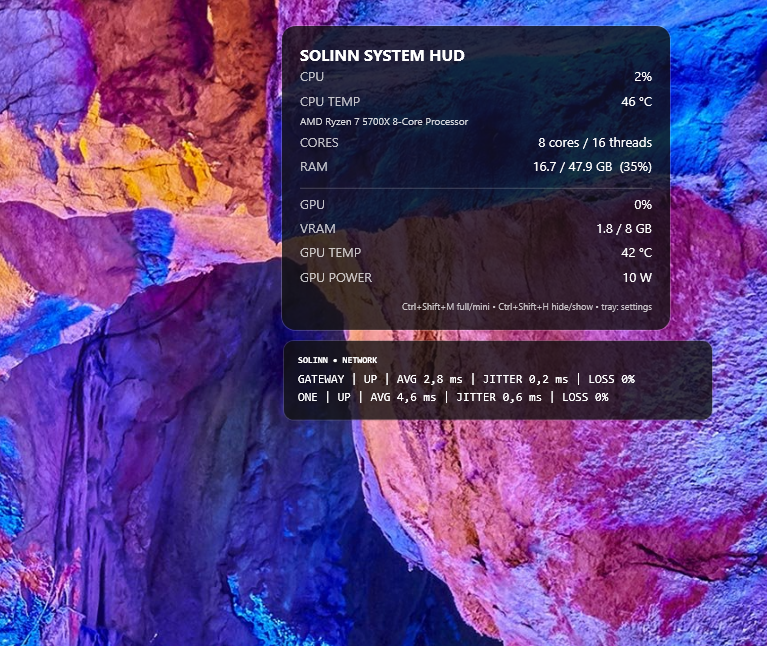
Keep CPU, GPU, RAM, VRAM, temperatures, applications, and network quality visible in a lightweight, discreet interface that adapts to your Windows workflow.
Windows desktop • In development • Founding Beta in preparation
BUILT FOR PEOPLE WHO WANT TO UNDERSTAND THEIR PC
System HUD is designed for people who need to understand machine behavior without turning monitoring into another heavy tool or another window to manage.
Keep system behavior visible while you play and quickly spot pressure on CPU, GPU, memory, or network quality.
Keep system resources and applications in context while compiling, testing, debugging, or working with local environments.
Watch GPU, VRAM, memory, and system load during local AI and generation workloads.
Track resources during rendering, editing, and other long-running creative workloads.
Get a quick machine-level view while working with services, network activity, and local workloads.
Keep the main workstation signals visible during tasks that depend on sustained system resources.
CORE CAPABILITIES
Three complementary views to understand what is happening on your machine at a glance.
CPU, GPU, RAM, VRAM, and temperatures where supported, organized for quick visibility while you work.
See running applications and identify which processes are consuming more system resources.
Monitor latency, average latency, jitter, and packet loss for better context about connection quality.
YOUR VIEW, YOUR SPACE
Choose how much screen space the HUD should use without losing the metrics that matter for the moment.
FULL
A more complete view for sessions where you want broader context across system, application, or network information.
MINI
A compact view that keeps the most important indicators visible without taking unnecessary screen space.
DESIGNED FOR DAILY USE
Quick access to HUD controls from the Windows notification area.
Keyboard shortcuts for important actions without interrupting your workflow.
Positioning designed for setups that use more than one display.
Visual options to adapt the HUD to your available space and usage context.
Configurable startup behavior to fit the HUD into the machine's routine.
Logs and health checks to support troubleshooting and beta support.
FOUNDING BETA
SOLINN System HUD is in development. The first public release is planned as a Founding Beta focused on the core system, application, and network monitoring experience, together with the controls needed for daily use and support.
The goal is to start with a smaller, clearer product experience, observe how it is actually used, and evolve the rest from real evidence.
Access conditions, availability, and commercial details will be announced when the first Founding Beta cohort opens.
ROADMAP
After the initial core, the roadmap may expand into broader categories based on usage, feedback, and product priority.
Roadmap subject to change based on Founding Beta learning.
SYSTEM HUD INTEREST
Choose the option that best matches your interest. You can switch between them at any time.
Joining the list shows interest. It does not guarantee immediate access or reserve a license.
This form is only used to map interest. The program, criteria, benefits, and commercial terms are still being defined.
FAQ
Not yet. The product is in development, and the first planned public opening is a Founding Beta. Access conditions will be announced when that stage is ready.
No. System HUD is Windows desktop software. Online services may support areas such as licensing, updates, or future integrations, but they do not define the core product.
The initial focus is System HUD FULL/MINI, CPU, GPU, RAM, VRAM and supported temperatures, application monitoring, network quality, tray controls and hotkeys, appearance, multi-monitor behavior, startup, and diagnostics.
Those capabilities belong to later roadmap categories and should not be treated as confirmed features of the first public release.
There is no final public price yet. Founding Beta commercial terms will be communicated when the offer is ready.
FOUNDING BETA
Join the interest list to receive updates about the first openings, availability, and next steps for System HUD.
Follow the Founding Beta